

Download Saurus CMS – Easy WYSIWYG Website Builder for Beginners
Overview
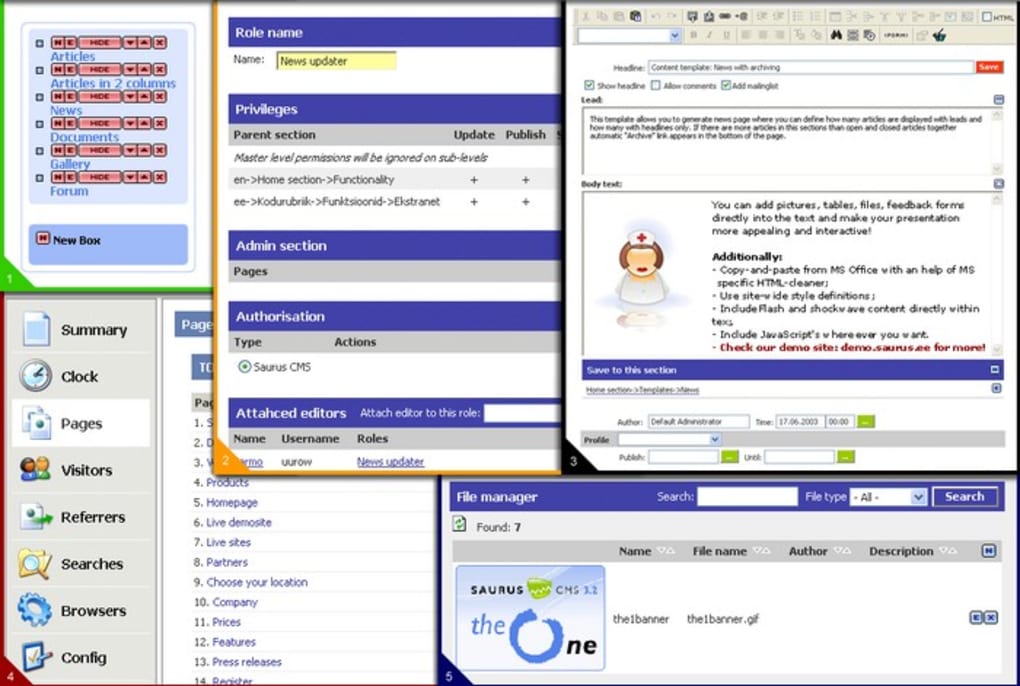
Saurus CMS positions itself as a friendly gateway for anyone who wants to dip their toes into web design without the steep learning curve of traditional development tools. Powered by a true WYSIWYG (What‑You‑See‑Is‑What‑You‑Get) editor, the platform eliminates the need for deep HTML or CSS expertise while still offering enough flexibility for users who wish to fine‑tune the look and feel of their sites. In practice, this means that the moment you drag a text block, insert an image, or add a navigation menu, you are looking at exactly how the final page will appear in a browser.
The editor also bundles a suite of ready‑made widgets—news lists, forums, image galleries, and product catalogues—so you can expand a simple brochure site into a full‑featured online presence with just a few clicks. Because the underlying code is generated securely by the CMS, you benefit from built‑in protection against common web threats, while still retaining the option to edit CSS directly if you have that knowledge. Whether you are a freelancer looking to showcase a portfolio, a small business needing a quick storefront, or an enthusiast eager to experiment with web design, Saurus CMS offers a balanced mix of simplicity and extensibility that makes the first steps feel achievable and rewarding.
Key Features
- True WYSIWYG Editing: Real‑time visual editing eliminates the guesswork of code‑centric builders.
- Responsive Templates: Pre‑designed layouts automatically adapt to desktop, tablet, and mobile screens.
- Drag‑and‑Drop Widgets: Insert news feeds, forums, image galleries, product catalogues, and contact forms without writing a line of code.
- Built‑in SEO Tools: Meta‑tag manager, sitemap generator, and friendly URL settings help search engines discover your pages.
- Secure Content Management: Role‑based permissions, automatic backups, and SSL support keep your site safe.
- Custom CSS Editing: Advanced users can tweak style sheets directly for pixel‑perfect control.
- Multilingual Support: Create and manage content in multiple languages from a single dashboard.
- Extensible Plugin Architecture: Community‑driven extensions add e‑commerce, analytics, and social media integrations.
- Automatic Updates: One‑click update system ensures you always run the latest, most secure version.
- Free Core Version: The core editor is free to download and use, with optional premium add‑ons for expanded functionality.
Installation & First‑Time Use
Step‑by‑Step Installation
Getting Saurus CMS up and running is intentionally straightforward. First, visit the official download page and click the “Download for Windows/macOS/Linux” button that matches your operating system. The installer is a compact .exe (Windows) or .dmg (macOS) file, approximately 45 MB, and includes all necessary server components such as a lightweight Apache‑like web server and SQLite database. Once the file is saved, run the installer and follow the on‑screen wizard:
- Accept the license agreement and choose the installation directory (default is
C:\SaurusCMSon Windows). - Select the components you want: Core CMS, optional plugins, and sample templates.
- Configure the admin credentials – a strong password is recommended.
- Finish the installation and click “Launch Saurus CMS”.
The first launch opens a web‑based setup wizard at http://localhost:8080. Here you define the site name, choose a primary template, and optionally import a demo site to explore the features instantly. After completing the wizard, you are redirected to the admin dashboard where the real fun begins.
Creating Your First Page
Inside the dashboard, click “Pages → Add New”. The WYSIWYG canvas appears with a toolbar similar to familiar word processors. Drag a “Header” block, type your site title, then add a “Text” block for introductory copy.
To insert an image, use the “Image Gallery” widget, upload files, and arrange them in a grid. For navigation, simply drop a “Menu” block and link it to the pages you have created. All changes are saved automatically, but you can also click “Preview” to see how the page renders on different devices.
When you are satisfied, hit “Publish” – the page goes live instantly at the URL you assigned.
Compatibility, System Requirements, and Pros & Cons
Saurus CMS runs on the three major desktop operating systems: Windows 10/11, macOS 10.15 and later, and major Linux distributions (Ubuntu 20.04+, Fedora 33+, Debian 10+). The bundled web server works on both 32‑bit and 64‑bit architectures, though 64‑bit is recommended for optimal performance. Minimum hardware requirements are modest – a dual‑core CPU, 2 GB RAM, and 500 MB of free disk space. Because the platform uses SQLite by default, there is no need for a separate database server, which simplifies installation on low‑resource machines. For larger sites, you can switch to MySQL or PostgreSQL through the “Advanced Settings” panel, but the core version remains fully functional with the default configuration.
Pros
- Intuitive drag‑and‑drop interface makes website creation accessible to non‑technical users.
- Responsive templates eliminate the need for separate mobile design work.
- Free core version provides essential features without hidden costs.
- Secure by default with role‑based access and automatic SSL support.
- Extensible via plugins for e‑commerce, analytics, and multilingual sites.
- One‑click update mechanism keeps the software current and safe.
- Cross‑platform compatibility ensures you can develop on Windows, macOS, or Linux.
Cons
- Advanced customization still requires basic knowledge of CSS and HTML.
- Limited built‑in e‑commerce features – you need third‑party plugins for a full store.
- Performance can degrade on very large sites unless you migrate to an external database.
- Community support is smaller compared to mainstream CMS platforms like WordPress.
- Some premium plugins are priced higher than comparable alternatives.
Overall, Saurus CMS delivers on its promise of a simple, secure, and flexible website builder for beginners. The WYSIWYG editor feels polished, the built‑in widgets cover most common needs, and the ability to dive into CSS when you’re ready adds a growth path for users. While it isn’t a full‑blown enterprise platform, its lightweight footprint and free core version make it an attractive option for small businesses, hobbyists, and educators who want to focus on content rather than code.
Frequently Asked Questions
Is Saurus CMS really free to use?
Yes, the core application and most of its basic widgets are free. Premium plugins and premium templates are sold separately, but you can build a fully functional website without purchasing anything.
Can I host a Saurus CMS site on a remote server?
Absolutely. After installing the software locally, you can copy the entire installation folder to any web host that supports PHP and SQLite (or MySQL/PostgreSQL if you switch). Update the configuration file with your domain details, and the site will run just like the local version.
How does Saurus CMS handle SEO?
The platform includes built‑in SEO settings for each page: you can edit meta titles, descriptions, keywords, and customize the URL slug. A dynamic sitemap.xml is generated automatically, and you can enable robots.txt editing from the dashboard.
Is there a mobile app to manage my site on the go?
Currently, Saurus CMS does not have a dedicated iOS or Android app. However, because the admin panel is fully responsive, you can log in from any mobile browser and perform basic content updates.
What kind of support is available?
The official website offers a knowledge base, video tutorials, and a community forum. For premium plugin buyers, priority email support is provided. The response time is typically within 24 hours on weekdays.
Conclusion & Call to Action
Saurus CMS strikes a commendable balance between ease of use and extensibility, making it a solid choice for anyone who wants to launch a website quickly without wrestling with code. Its true WYSIWYG environment, responsive templates, and secure content management give beginners confidence, while the option to edit CSS or add premium plugins ensures the platform can grow with your ambitions. If you’re looking for a free, cross‑platform solution that lets you focus on design and content, give Saurus CMS a try today. Download the installer now, follow the simple setup, and start building your online presence in minutes.